









 Ansible

 PS DSC

WebView2 Runtime (Install) 142.0.3595.90
This is not the latest version of WebView2 Runtime (Install) available.
Legal Disclaimer: Neither this package nor Chocolatey Software, Inc. are affiliated with or endorsed by Microsoft. The inclusion of Microsoft trademark(s), if any, upon this webpage is solely to identify Microsoft goods or services and not for commercial purposes.
- 1
- 2
- 3
All Checks are Passing
3 Passing Tests
Deployment Method: Individual Install, Upgrade, & Uninstall
To install WebView2 Runtime (Install), run the following command from the command line or from PowerShell:
To upgrade WebView2 Runtime (Install), run the following command from the command line or from PowerShell:
To uninstall WebView2 Runtime (Install), run the following command from the command line or from PowerShell:
Deployment Method:
This applies to both open source and commercial editions of Chocolatey.
1. Enter Your Internal Repository Url
(this should look similar to https://community-choco.oraclestar.dev/api/v2/)
2. Setup Your Environment
1. Ensure you are set for organizational deployment
Please see the organizational deployment guide
2. Get the package into your environment
Option 1: Cached Package (Unreliable, Requires Internet - Same As Community)-
Open Source or Commercial:
- Proxy Repository - Create a proxy nuget repository on Nexus, Artifactory Pro, or a proxy Chocolatey repository on ProGet. Point your upstream to https://community-choco.oraclestar.dev/api/v2/. Packages cache on first access automatically. Make sure your choco clients are using your proxy repository as a source and NOT the default community repository. See source command for more information.
- You can also just download the package and push it to a repository Download
-
Open Source
-
Download the package:
Download - Follow manual internalization instructions
-
-
Package Internalizer (C4B)
-
Run: (additional options)
choco download webview2-runtime --internalize --version=142.0.3595.90 --source=https://community-choco.oraclestar.dev/api/v2/ -
For package and dependencies run:
choco push --source="'INTERNAL REPO URL'" - Automate package internalization
-
Run: (additional options)
3. Copy Your Script
choco upgrade webview2-runtime -y --source="'INTERNAL REPO URL'" --version="'142.0.3595.90'" [other options]See options you can pass to upgrade.
See best practices for scripting.
Add this to a PowerShell script or use a Batch script with tools and in places where you are calling directly to Chocolatey. If you are integrating, keep in mind enhanced exit codes.
If you do use a PowerShell script, use the following to ensure bad exit codes are shown as failures:
choco upgrade webview2-runtime -y --source="'INTERNAL REPO URL'" --version="'142.0.3595.90'"
$exitCode = $LASTEXITCODE

Write-Verbose "Exit code was $exitCode"
$validExitCodes = @(0, 1605, 1614, 1641, 3010)
if ($validExitCodes -contains $exitCode) {
  Exit 0
}

Exit $exitCode
- name: Install webview2-runtime
  win_chocolatey:
    name: webview2-runtime
    version: '142.0.3595.90'
    source: INTERNAL REPO URL
    state: present
See docs at https://docs.ansible.com/ansible/latest/modules/win_chocolatey_module.html.
chocolatey_package 'webview2-runtime' do
  action    :install
  source   'INTERNAL REPO URL'
  version  '142.0.3595.90'
end
See docs at https://docs.chef.io/resource_chocolatey_package.html.
cChocoPackageInstaller webview2-runtime
{
    Name     = "webview2-runtime"
    Version  = "142.0.3595.90"
    Source   = "INTERNAL REPO URL"
}
Requires cChoco DSC Resource. See docs at https://github.com/chocolatey/cChoco.
package { 'webview2-runtime':
  ensure   => '142.0.3595.90',
  provider => 'chocolatey',
  source   => 'INTERNAL REPO URL',
}
Requires Puppet Chocolatey Provider module. See docs at https://forge.puppet.com/puppetlabs/chocolatey.
4. If applicable - Chocolatey configuration/installation
See infrastructure management matrix for Chocolatey configuration elements and examples.
This package was approved as a trusted package on 18 Nov 2025.
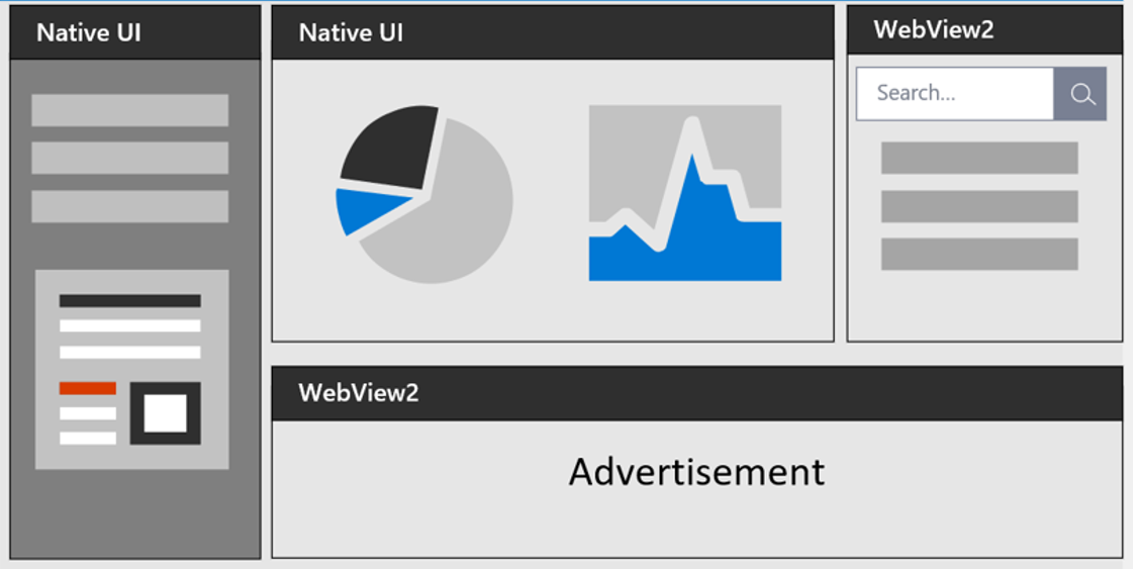
The Microsoft Edge WebView2 control allows you to embed web technologies (HTML, CSS, and JavaScript) in your native apps. The WebView2 control uses Microsoft Edge as the rendering engine to display the web content in native apps.
With WebView2, you can embed web code in different parts of your native app, or build all of the native app within a single WebView instance.
Notes
- This package uses the offline installer.
- It has been shown in testing that after installation, the components may need some extra time to register on Windows. If you have issues, please restart the application or in extreme cases a repair may be needed.
- This is an automatically updated package. If you find it is out of date by more than a week, please contact the maintainer(s) and let them know the package is no longer updating correctly.
- I am unable to answer comments left on Disqus. If you have something related to the package:
- Raise a discussion for questions.
- Raise an issue for a broken package.
$ErrorActionPreference = 'Stop'

$packageArgs = @{
  packageName   = $env:ChocolateyPackageName
  softwareName  = 'Microsoft Edge WebView2 Runtime'
  fileType      = 'EXE'
  # MSI
  silentArgs    = '--uninstall --msedgewebview --system-level --verbose-logging --force-uninstall'
  validExitCodes = @(0, 19)   # no matter the combination of switches I use, 19 is always the exit code
}

[array]$key = Get-UninstallRegistryKey -SoftwareName $packageArgs['softwareName']

if ($key.Count -eq 1) {
    $packageArgs['file'] = ($key.UninstallString).replace(' --uninstall --msedgewebview --system-level --verbose-logging', '')

    Uninstall-ChocolateyPackage @packageArgs
}
elseif ($key.Count -eq 0) {
  Write-Warning "$packageName has already been uninstalled by other means."
}
elseif ($key.Count -gt 1) {
  Write-Warning "$($key.Count) matches found!"
  Write-Warning "To prevent accidental data loss, no programs will be uninstalled."
  Write-Warning "Please alert package maintainer the following keys were matched:"
  $key | % {Write-Warning "- $($_.DisplayName)"}
}
Log in or click on link to see number of positives.
- webview2-runtime.142.0.3595.90.nupkg (88f811d42ec4) - ## / 67
- MicrosoftEdgeWebView2RuntimeInstallerX64.exe (37094ffafea3) - ## / 67
- MicrosoftEdgeWebView2RuntimeInstallerX86.exe (2efac14921d3) - ## / 69
In cases where actual malware is found, the packages are subject to removal. Software sometimes has false positives. Moderators do not necessarily validate the safety of the underlying software, only that a package retrieves software from the official distribution point and/or validate embedded software against official distribution point (where distribution rights allow redistribution).
Chocolatey Pro provides runtime protection from possible malware.
| Add to Builder | Version | Downloads | Last Updated | Status |
|---|---|---|---|---|
| WebView2 Runtime (Install) 143.0.3650.96 | 3955 | Friday, December 19, 2025 | Approved | |
| WebView2 Runtime (Install) 143.0.3650.80 | 39366 | Friday, December 12, 2025 | Approved | |
| WebView2 Runtime (Install) 143.0.3650.75 | 28823 | Tuesday, December 9, 2025 | Approved | |
| WebView2 Runtime (Install) 143.0.3650.66 | 29259 | Friday, December 5, 2025 | Approved | |
| WebView2 Runtime (Install) 142.0.3595.120 | 1097 | Friday, December 5, 2025 | Approved | |
| WebView2 Runtime (Install) 142.0.3595.94 | 50830 | Friday, November 21, 2025 | Approved | |
| WebView2 Runtime (Install) 142.0.3595.90 | 24690 | Tuesday, November 18, 2025 | Approved | |
| WebView2 Runtime (Install) 142.0.3595.80 | 32998 | Friday, November 14, 2025 | Approved | |
| WebView2 Runtime (Install) 142.0.3595.76 | 17329 | Wednesday, November 12, 2025 | Approved | |
| WebView2 Runtime (Install) 142.0.3595.69 | 31564 | Saturday, November 8, 2025 | Approved | |
| WebView2 Runtime (Install) 141.0.3537.57 | 76673 | Friday, October 3, 2025 | Approved | |
| WebView2 Runtime (Install) 140.0.3485.94 | 35892 | Friday, September 26, 2025 | Approved | |
| WebView2 Runtime (Install) 140.0.3485.81 | 33506 | Friday, September 19, 2025 | Approved | |
| WebView2 Runtime (Install) 140.0.3485.66 | 38119 | Friday, September 12, 2025 | Approved | |
| WebView2 Runtime (Install) 140.0.3485.54 | 37806 | Saturday, September 6, 2025 | Approved | |
| WebView2 Runtime (Install) 139.0.3405.125 | 38266 | Friday, August 29, 2025 | Approved | |
| WebView2 Runtime (Install) 139.0.3405.119 | 24555 | Tuesday, August 26, 2025 | Approved | |
| WebView2 Runtime (Install) 139.0.3405.111 | 27352 | Friday, August 22, 2025 | Approved | |
| WebView2 Runtime (Install) 139.0.3405.102 | 32778 | Saturday, August 16, 2025 | Approved | |
| WebView2 Runtime (Install) 139.0.3405.86 | 33907 | Friday, August 8, 2025 | Approved | |
| WebView2 Runtime (Install) 138.0.3351.121 | 32179 | Friday, August 1, 2025 | Approved | |
| WebView2 Runtime (Install) 138.0.3351.109 | 27543 | Friday, July 25, 2025 | Approved | |
| WebView2 Runtime (Install) 138.0.3351.95 | 36283 | Wednesday, July 16, 2025 | Approved | |
| WebView2 Runtime (Install) 138.0.3351.83 | 30581 | Friday, July 11, 2025 | Approved | |
| WebView2 Runtime (Install) 138.0.3351.78 | 6046 | Wednesday, July 9, 2025 | Approved | |
| WebView2 Runtime (Install) 138.0.3351.77 | 99158 | Tuesday, July 8, 2025 | Approved | |
| WebView2 Runtime (Install) 138.0.3351.65 | 33154 | Tuesday, July 1, 2025 | Approved | |
| WebView2 Runtime (Install) 138.0.3351.55 | 27654 | Friday, June 27, 2025 | Approved | |
| WebView2 Runtime (Install) 137.0.3296.83 | 601872 | Sunday, June 15, 2025 | Approved | |
| WebView2 Runtime (Install) 137.0.3296.68 | 40574 | Saturday, June 7, 2025 | Approved | |
| WebView2 Runtime (Install) 137.0.3296.62 | 24829 | Wednesday, June 4, 2025 | Approved | |
| WebView2 Runtime (Install) 137.0.3296.58 | 20034 | Tuesday, June 3, 2025 | Approved | |
| WebView2 Runtime (Install) 137.0.3296.52 | 24182 | Friday, May 30, 2025 | Approved | |
| WebView2 Runtime (Install) 136.0.3240.92 | 32300 | Friday, May 23, 2025 | Approved | |
| WebView2 Runtime (Install) 136.0.3240.76 | 39251 | Thursday, May 15, 2025 | Approved | |
| WebView2 Runtime (Install) 136.0.3240.64 | 35330 | Friday, May 9, 2025 | Approved | |
| WebView2 Runtime (Install) 136.0.3240.50 | 34599 | Friday, May 2, 2025 | Approved | |
| WebView2 Runtime (Install) 135.0.3179.98 | 34133 | Friday, April 25, 2025 | Approved | |
| WebView2 Runtime (Install) 135.0.3179.85 | 32447 | Friday, April 18, 2025 | Approved | |
| WebView2 Runtime (Install) 135.0.3179.73 | 29076 | Saturday, April 12, 2025 | Approved | |
| WebView2 Runtime (Install) 135.0.3179.66 | 19079 | Wednesday, April 9, 2025 | Approved | |
| WebView2 Runtime (Install) 135.0.3179.54 | 26777 | Friday, April 4, 2025 | Approved | |
| WebView2 Runtime (Install) 134.0.3124.93 | 35638 | Thursday, March 27, 2025 | Approved | |
| WebView2 Runtime (Install) 134.0.3124.85 | 24031 | Tuesday, March 25, 2025 | Approved | |
| WebView2 Runtime (Install) 134.0.3124.83 | 22285 | Saturday, March 22, 2025 | Approved | |
| WebView2 Runtime (Install) 134.0.3124.72 | 39965 | Saturday, March 15, 2025 | Approved | |
| WebView2 Runtime (Install) 134.0.3124.68 | 10447 | Friday, March 14, 2025 | Approved | |
| WebView2 Runtime (Install) 134.0.3124.66 | 14943 | Wednesday, March 12, 2025 | Approved | |
| WebView2 Runtime (Install) 133.0.3065.92 | 43256 | Friday, February 28, 2025 | Approved | |
| WebView2 Runtime (Install) 133.0.3065.82 | 32509 | Saturday, February 22, 2025 | Approved | |
| WebView2 Runtime (Install) 133.0.3065.69 | 33554 | Saturday, February 15, 2025 | Approved | |
| WebView2 Runtime (Install) 133.0.3065.59 | 25694 | Tuesday, February 11, 2025 | Approved | |
| WebView2 Runtime (Install) 133.0.3065.51 | 22418 | Friday, February 7, 2025 | Approved | |
| WebView2 Runtime (Install) 132.0.2957.140 | 32248 | Friday, January 31, 2025 | Approved | |
| WebView2 Runtime (Install) 132.0.2957.127 | 23614 | Saturday, January 25, 2025 | Approved | |
| WebView2 Runtime (Install) 132.0.2957.115 | 19076 | Saturday, January 18, 2025 | Approved | |
| WebView2 Runtime (Install) 131.0.2903.146 | 24350 | Saturday, January 11, 2025 | Approved | |
| WebView2 Runtime (Install) 131.0.2903.112 | 35154 | Friday, December 20, 2024 | Approved | |
| WebView2 Runtime (Install) 131.0.2903.99 | 26808 | Friday, December 13, 2024 | Approved | |
| WebView2 Runtime (Install) 131.0.2903.86 | 33347 | Friday, December 6, 2024 | Approved | |
| WebView2 Runtime (Install) 131.0.2903.70 | 42242 | Tuesday, November 26, 2024 | Approved | |
| WebView2 Runtime (Install) 131.0.2903.63 | 20250 | Friday, November 22, 2024 | Approved | |
| WebView2 Runtime (Install) 131.0.2903.51 | 36067 | Saturday, November 16, 2024 | Approved | |
| WebView2 Runtime (Install) 131.0.2903.48 | 14839 | Friday, November 15, 2024 | Approved | |
| WebView2 Runtime (Install) 130.0.2849.80 | 34134 | Friday, November 8, 2024 | Approved | |
| WebView2 Runtime (Install) 130.0.2849.68 | 39860 | Friday, November 1, 2024 | Approved | |
| WebView2 Runtime (Install) 130.0.2849.56 | 36083 | Friday, October 25, 2024 | Approved | |
| WebView2 Runtime (Install) 130.0.2849.52 | 6932 | Wednesday, October 23, 2024 | Approved | |
| WebView2 Runtime (Install) 130.0.2849.46 | 14267 | Friday, October 18, 2024 | Approved | |
| WebView2 Runtime (Install) 129.0.2792.89 | 18728 | Friday, October 11, 2024 | Approved | |
| WebView2 Runtime (Install) 129.0.2792.79 | 13543 | Friday, October 4, 2024 | Approved | |
| WebView2 Runtime (Install) 129.0.2792.65 | 24598 | Friday, September 27, 2024 | Approved | |
| WebView2 Runtime (Install) 129.0.2792.52 | 24159 | Friday, September 20, 2024 | Approved | |
| WebView2 Runtime (Install) 128.0.2739.79 | 13823 | Friday, September 13, 2024 | Approved | |
| WebView2 Runtime (Install) 128.0.2739.67 | 10827 | Friday, September 6, 2024 | Approved | |
| WebView2 Runtime (Install) 128.0.2739.63 | 11382 | Wednesday, September 4, 2024 | Approved | |
| WebView2 Runtime (Install) 128.0.2739.54 | 15480 | Friday, August 30, 2024 | Approved | |
| WebView2 Runtime (Install) 128.0.2739.42 | 18336 | Friday, August 23, 2024 | Approved | |
| WebView2 Runtime (Install) 127.0.2651.105 | 17400 | Friday, August 16, 2024 | Approved | |
| WebView2 Runtime (Install) 127.0.2651.98 | 17940 | Friday, August 9, 2024 | Approved | |
| WebView2 Runtime (Install) 127.0.2651.86 | 18929 | Friday, August 2, 2024 | Approved | |
| WebView2 Runtime (Install) 127.0.2651.74 | 14660 | Friday, July 26, 2024 | Approved | |
| WebView2 Runtime (Install) 126.0.2592.113 | 14703 | Friday, July 19, 2024 | Approved | |
| WebView2 Runtime (Install) 126.0.2592.102 | 17531 | Friday, July 12, 2024 | Approved | |
| WebView2 Runtime (Install) 126.0.2592.87 | 22681 | Wednesday, July 3, 2024 | Approved | |
| WebView2 Runtime (Install) 126.0.2592.81 | 12686 | Friday, June 28, 2024 | Approved | |
| WebView2 Runtime (Install) 126.0.2592.68 | 16838 | Friday, June 21, 2024 | Approved | |
| WebView2 Runtime (Install) 126.0.2592.61 | 8853 | Tuesday, June 18, 2024 | Approved | |
| WebView2 Runtime (Install) 126.0.2592.56 | 12018 | Friday, June 14, 2024 | Approved | |
| WebView2 Runtime (Install) 125.0.2535.92 | 15581 | Friday, June 7, 2024 | Approved | |
| WebView2 Runtime (Install) 125.0.2535.85 | 9948 | Tuesday, June 4, 2024 | Approved | |
| WebView2 Runtime (Install) 125.0.2535.79 | 13916 | Friday, May 31, 2024 | Approved | |
| WebView2 Runtime (Install) 125.0.2535.67 | 21693 | Saturday, May 25, 2024 | Approved | |
| WebView2 Runtime (Install) 125.0.2535.51 | 16954 | Tuesday, May 21, 2024 | Approved | |
| WebView2 Runtime (Install) 123.0.2420.81 | 193640 | Friday, April 12, 2024 | Approved | |
| WebView2 Runtime (Install) 122.0.2365.80 | 48429 | Friday, March 8, 2024 | Approved | |
| WebView2 Runtime (Install) 122.0.2365.66 | 16171 | Saturday, March 2, 2024 | Approved | |
| WebView2 Runtime (Install) 122.0.2365.63 | 4901 | Friday, March 1, 2024 | Approved | |
| WebView2 Runtime (Install) 122.0.2365.59 | 7543 | Wednesday, February 28, 2024 | Approved | |
| WebView2 Runtime (Install) 122.0.2365.52 | 71454 | Saturday, February 24, 2024 | Approved | |
| WebView2 Runtime (Install) 121.0.2277.128 | 16898 | Friday, February 16, 2024 | Approved | |
| WebView2 Runtime (Install) 121.0.2277.112 | 16095 | Friday, February 9, 2024 | Approved | |
| WebView2 Runtime (Install) 121.0.2277.106 | 8924 | Tuesday, February 6, 2024 | Approved | |
| WebView2 Runtime (Install) 121.0.2277.98 | 14128 | Friday, February 2, 2024 | Approved | |
| WebView2 Runtime (Install) 121.0.2277.83 | 35425 | Friday, January 26, 2024 | Approved | |
| WebView2 Runtime (Install) 120.0.2210.144 | 14946 | Thursday, January 18, 2024 | Approved | |
| WebView2 Runtime (Install) 120.0.2210.133 | 12026 | Friday, January 12, 2024 | Approved | |
| WebView2 Runtime (Install) 120.0.2210.121 | 11383 | Saturday, January 6, 2024 | Approved | |
| WebView2 Runtime (Install) 120.0.2210.91 | 13713 | Friday, December 22, 2023 | Approved | |
| WebView2 Runtime (Install) 120.0.2210.89 | 4127 | Thursday, December 21, 2023 | Approved | |
| WebView2 Runtime (Install) 120.0.2210.77 | 10245 | Friday, December 15, 2023 | Approved | |
| WebView2 Runtime (Install) 120.0.2210.61 | 14610 | Friday, December 8, 2023 | Approved | |
| WebView2 Runtime (Install) 119.0.2151.97 | 12549 | Thursday, November 30, 2023 | Approved | |
| WebView2 Runtime (Install) 119.0.2151.72 | 12769 | Friday, November 17, 2023 | Approved | |
| WebView2 Runtime (Install) 119.0.2151.58 | 11399 | Friday, November 10, 2023 | Approved | |
| WebView2 Runtime (Install) 119.0.2151.44 | 10810 | Friday, November 3, 2023 | Approved | |
| WebView2 Runtime (Install) 118.0.2088.76 | 19507 | Saturday, October 28, 2023 | Approved | |
| WebView2 Runtime (Install) 118.0.2088.69 | 8819 | Wednesday, October 25, 2023 | Approved | |
| WebView2 Runtime (Install) 118.0.2088.61 | 12011 | Saturday, October 21, 2023 | Approved | |
| WebView2 Runtime (Install) 118.0.2088.57 | 7122 | Thursday, October 19, 2023 | Approved | |
| WebView2 Runtime (Install) 118.0.2088.46 | 10844 | Saturday, October 14, 2023 | Approved | |
| WebView2 Runtime (Install) 117.0.2045.60 | 9566 | Saturday, October 7, 2023 | Approved | |
| WebView2 Runtime (Install) 117.0.2045.55 | 5649 | Thursday, October 5, 2023 | Approved | |
| WebView2 Runtime (Install) 117.0.2045.47 | 8073 | Saturday, September 30, 2023 | Approved | |
| WebView2 Runtime (Install) 117.0.2045.43 | 7690 | Monday, September 25, 2023 | Approved | |
| WebView2 Runtime (Install) 117.0.2045.41 | 5356 | Sunday, September 24, 2023 | Approved | |
| WebView2 Runtime (Install) 117.0.2045.40 | 3550 | Saturday, September 23, 2023 | Approved | |
| WebView2 Runtime (Install) 117.0.2045.36 | 6996 | Wednesday, September 20, 2023 | Approved | |
| WebView2 Runtime (Install) 117.0.2045.35 | 817 | Tuesday, September 19, 2023 | Approved | |
| WebView2 Runtime (Install) 117.0.2045.31 | 15238 | Saturday, September 16, 2023 | Approved | |
| WebView2 Runtime (Install) 116.0.1938.81 | 6102 | Wednesday, September 13, 2023 | Approved | |
| WebView2 Runtime (Install) 116.0.1938.76 | 5305 | Friday, September 8, 2023 | Approved | |
| WebView2 Runtime (Install) 116.0.1938.69 | 8238 | Friday, September 1, 2023 | Approved | |
| WebView2 Runtime (Install) 116.0.1938.62 | 6016 | Saturday, August 26, 2023 | Approved | |
| WebView2 Runtime (Install) 116.0.1938.54 | 5195 | Tuesday, August 22, 2023 | Approved | |
| WebView2 Runtime (Install) 115.0.1901.203 | 8101 | Friday, August 11, 2023 | Approved | |
| WebView2 Runtime (Install) 115.0.1901.200 | 6142 | Tuesday, August 8, 2023 | Approved | |
| WebView2 Runtime (Install) 115.0.1901.188 | 11222 | Friday, July 28, 2023 | Approved | |
| WebView2 Runtime (Install) 115.0.1901.183 | 6313 | Saturday, July 22, 2023 | Approved | |
| WebView2 Runtime (Install) 114.0.1823.82 | 6703 | Friday, July 14, 2023 | Approved | |
| WebView2 Runtime (Install) 114.0.1823.79 | 4978 | Tuesday, July 11, 2023 | Approved | |
| WebView2 Runtime (Install) 114.0.1823.67 | 8049 | Friday, June 30, 2023 | Approved | |
| WebView2 Runtime (Install) 114.0.1823.58 | 5649 | Friday, June 23, 2023 | Approved | |
| WebView2 Runtime (Install) 114.0.1823.55 | 4103 | Tuesday, June 20, 2023 | Approved | |
| WebView2 Runtime (Install) 114.0.1823.51 | 3883 | Friday, June 16, 2023 | Approved | |
| WebView2 Runtime (Install) 114.0.1823.43 | 5432 | Friday, June 9, 2023 | Approved | |
| WebView2 Runtime (Install) 114.0.1823.41 | 3320 | Wednesday, June 7, 2023 | Approved | |
| WebView2 Runtime (Install) 114.0.1823.37 | 2477 | Monday, June 5, 2023 | Approved | |
| WebView2 Runtime (Install) 113.0.1774.57 | 7095 | Sunday, May 28, 2023 | Approved | |
| WebView2 Runtime (Install) 110.0.1587.69 | 28909 | Sunday, March 12, 2023 | Approved | |
| WebView2 Runtime (Install) 110.0.1587.63 | 4348 | Sunday, March 5, 2023 | Approved | |
| WebView2 Runtime (Install) 110.0.1587.57 | 2768 | Tuesday, February 28, 2023 | Approved | |
| WebView2 Runtime (Install) 110.0.1587.56 | 2028 | Sunday, February 26, 2023 | Approved | |
| WebView2 Runtime (Install) 110.0.1587.50 | 2837 | Tuesday, February 21, 2023 | Approved | |
| WebView2 Runtime (Install) 110.0.1587.49 | 1697 | Sunday, February 19, 2023 | Approved | |
| WebView2 Runtime (Install) 110.0.1587.46 | 960 | Saturday, February 18, 2023 | Approved | |
| WebView2 Runtime (Install) 109.0.1518.78 | 5494 | Sunday, February 5, 2023 | Approved | |
| WebView2 Runtime (Install) 109.0.1518.70 | 2901 | Monday, January 30, 2023 | Approved | |
| WebView2 Runtime (Install) 109.0.1518.69 | 1073 | Saturday, January 28, 2023 | Approved | |
| WebView2 Runtime (Install) 109.0.1518.61 | 2756 | Sunday, January 22, 2023 | Approved | |
| WebView2 Runtime (Install) 109.0.1518.52 | 3963 | Monday, January 16, 2023 | Approved | |
| WebView2 Runtime (Install) 108.0.1462.76 | 3572 | Sunday, January 8, 2023 | Approved | |
| WebView2 Runtime (Install) 108.0.1462.54 | 5073 | Sunday, December 18, 2022 | Approved | |
| WebView2 Runtime (Install) 108.0.1462.46 | 2963 | Sunday, December 11, 2022 | Approved | |
| WebView2 Runtime (Install) 108.0.1462.44 | 739 | Friday, December 9, 2022 | Approved | |
| WebView2 Runtime (Install) 107.0.1418.62 | 3288 | Thursday, December 1, 2022 | Approved | |
| WebView2 Runtime (Install) 107.0.1418.56 | 2454 | Thursday, November 24, 2022 | Approved | |
| WebView2 Runtime (Install) 107.0.1418.52 | 2231 | Sunday, November 20, 2022 | Approved | |
| WebView2 Runtime (Install) 107.0.1418.42 | 3687 | Sunday, November 13, 2022 | Approved | |
| WebView2 Runtime (Install) 107.0.1418.35 | 2720 | Sunday, November 6, 2022 | Approved | |
| WebView2 Runtime (Install) 107.0.1418.26 | 2022 | Tuesday, November 1, 2022 | Approved | |
| WebView2 Runtime (Install) 107.0.1418.24 | 1314 | Sunday, October 30, 2022 | Approved | |
| WebView2 Runtime (Install) 106.0.1370.52 | 2034 | Sunday, October 23, 2022 | Approved | |
| WebView2 Runtime (Install) 106.0.1370.47 | 1813 | Monday, October 17, 2022 | Approved | |
| WebView2 Runtime (Install) 106.0.1370.42 | 5955 | Thursday, October 13, 2022 | Approved | |
| WebView2 Runtime (Install) 106.0.1370.37 | 2038 | Sunday, October 9, 2022 | Approved | |
| WebView2 Runtime (Install) 106.0.1370.34 | 1317 | Thursday, October 6, 2022 | Approved | |
| WebView2 Runtime (Install) 105.0.1343.53 | 2419 | Thursday, September 29, 2022 | Approved | |
| WebView2 Runtime (Install) 105.0.1343.50 | 1622 | Sunday, September 25, 2022 | Approved | |
| WebView2 Runtime (Install) 105.0.1343.42 | 2174 | Sunday, September 18, 2022 | Approved | |
| WebView2 Runtime (Install) 105.0.1343.33 | 2117 | Sunday, September 11, 2022 | Approved | |
| WebView2 Runtime (Install) 105.0.1343.27 | 1792 | Tuesday, September 6, 2022 | Approved | |
| WebView2 Runtime (Install) 105.0.1343.25 | 1393 | Sunday, September 4, 2022 | Approved | |
| WebView2 Runtime (Install) 104.0.1293.70 | 2159 | Sunday, August 28, 2022 | Approved | |
| WebView2 Runtime (Install) 104.0.1293.63 | 2096 | Monday, August 22, 2022 | Approved | |
| WebView2 Runtime (Install) 104.0.1293.54 | 2113 | Sunday, August 14, 2022 | Approved | |
| WebView2 Runtime (Install) 104.0.1293.47 | 1551 | Monday, August 8, 2022 | Approved | |
| WebView2 Runtime (Install) 103.0.1264.77 | 2332 | Sunday, July 31, 2022 | Approved | |
| WebView2 Runtime (Install) 103.0.1264.71 | 1991 | Monday, July 25, 2022 | Approved | |
| WebView2 Runtime (Install) 103.0.1264.62 | 2142 | Sunday, July 17, 2022 | Approved | |
| WebView2 Runtime (Install) 103.0.1264.49 | 1787 | Saturday, July 9, 2022 | Approved | |
| WebView2 Runtime (Install) 103.0.1264.44 | 1859 | Sunday, July 3, 2022 | Approved | |
| WebView2 Runtime (Install) 103.0.1264.37 | 1688 | Monday, June 27, 2022 | Approved | |
| WebView2 Runtime (Install) 102.0.1245.44 | 1961 | Sunday, June 19, 2022 | Approved | |
| WebView2 Runtime (Install) 101.0.1210.53 | 2425 | Sunday, May 22, 2022 | Approved | |
| WebView2 Runtime (Install) 101.0.1210.47 | 985 | Monday, May 16, 2022 | Approved | |
| WebView2 Runtime (Install) 101.0.1210.39 | 1148 | Sunday, May 8, 2022 | Approved | |
| WebView2 Runtime (Install) 101.0.1210.32 | 741 | Monday, May 2, 2022 | Approved | |
| WebView2 Runtime (Install) 100.0.1185.50 | 129 | Sunday, April 24, 2022 | Approved | |
| WebView2 Runtime (Install) 100.0.1185.44 | 138 | Monday, April 18, 2022 | Approved | |
| WebView2 Runtime (Install) 100.0.1185.39 | 1060 | Thursday, April 14, 2022 | Approved | |
| WebView2 Runtime (Install) 100.0.1185.36 | 777 | Sunday, April 10, 2022 | Approved | |
| WebView2 Runtime (Install) 99.0.1150.46 | 166 | Sunday, March 20, 2022 | Approved | |
| WebView2 Runtime (Install) 99.0.1150.39 | 155 | Wednesday, March 16, 2022 | Approved | |
| WebView2 Runtime (Install) 99.0.1150.36 | 1243 | Sunday, March 13, 2022 | Approved |
Copyright 2022 Microsoft Corporation
This package has no dependencies.
Ground Rules:
- This discussion is only about WebView2 Runtime (Install) and the WebView2 Runtime (Install) package. If you have feedback for Chocolatey, please contact the Google Group.
- This discussion will carry over multiple versions. If you have a comment about a particular version, please note that in your comments.
- The maintainers of this Chocolatey Package will be notified about new comments that are posted to this Disqus thread, however, it is NOT a guarantee that you will get a response. If you do not hear back from the maintainers after posting a message below, please follow up by using the link on the left side of this page or follow this link to contact maintainers. If you still hear nothing back, please follow the package triage process.
- Tell us what you love about the package or WebView2 Runtime (Install), or tell us what needs improvement.
- Share your experiences with the package, or extra configuration or gotchas that you've found.
- If you use a url, the comment will be flagged for moderation until you've been whitelisted. Disqus moderated comments are approved on a weekly schedule if not sooner. It could take between 1-5 days for your comment to show up.