









 Ansible

 PS DSC

PlantUML 1.2017.15
This is not the latest version of PlantUML available.
Legal Disclaimer: Neither this package nor Chocolatey Software, Inc. are affiliated with or endorsed by Arnaud Roques. The inclusion of Arnaud Roques trademark(s), if any, upon this webpage is solely to identify Arnaud Roques goods or services and not for commercial purposes.
- 1
- 2
- 3
All Checks are Passing
3 Passing Tests
Deployment Method: Individual Install, Upgrade, & Uninstall
To install PlantUML, run the following command from the command line or from PowerShell:
To upgrade PlantUML, run the following command from the command line or from PowerShell:
To uninstall PlantUML, run the following command from the command line or from PowerShell:
Deployment Method:
This applies to both open source and commercial editions of Chocolatey.
1. Enter Your Internal Repository Url
(this should look similar to https://community-choco.oraclestar.dev/api/v2/)
2. Setup Your Environment
1. Ensure you are set for organizational deployment
Please see the organizational deployment guide
2. Get the package into your environment
Option 1: Cached Package (Unreliable, Requires Internet - Same As Community)-
Open Source or Commercial:
- Proxy Repository - Create a proxy nuget repository on Nexus, Artifactory Pro, or a proxy Chocolatey repository on ProGet. Point your upstream to https://community-choco.oraclestar.dev/api/v2/. Packages cache on first access automatically. Make sure your choco clients are using your proxy repository as a source and NOT the default community repository. See source command for more information.
- You can also just download the package and push it to a repository Download
-
Open Source
-
Download the package:
Download - Follow manual internalization instructions
-
-
Package Internalizer (C4B)
-
Run: (additional options)
choco download plantuml --internalize --version=1.2017.15 --source=https://community-choco.oraclestar.dev/api/v2/ -
For package and dependencies run:
choco push --source="'INTERNAL REPO URL'" - Automate package internalization
-
Run: (additional options)
3. Copy Your Script
choco upgrade plantuml -y --source="'INTERNAL REPO URL'" --version="'1.2017.15'" [other options]See options you can pass to upgrade.
See best practices for scripting.
Add this to a PowerShell script or use a Batch script with tools and in places where you are calling directly to Chocolatey. If you are integrating, keep in mind enhanced exit codes.
If you do use a PowerShell script, use the following to ensure bad exit codes are shown as failures:
choco upgrade plantuml -y --source="'INTERNAL REPO URL'" --version="'1.2017.15'"
$exitCode = $LASTEXITCODE

Write-Verbose "Exit code was $exitCode"
$validExitCodes = @(0, 1605, 1614, 1641, 3010)
if ($validExitCodes -contains $exitCode) {
  Exit 0
}

Exit $exitCode
- name: Install plantuml
  win_chocolatey:
    name: plantuml
    version: '1.2017.15'
    source: INTERNAL REPO URL
    state: present
See docs at https://docs.ansible.com/ansible/latest/modules/win_chocolatey_module.html.
chocolatey_package 'plantuml' do
  action    :install
  source   'INTERNAL REPO URL'
  version  '1.2017.15'
end
See docs at https://docs.chef.io/resource_chocolatey_package.html.
cChocoPackageInstaller plantuml
{
    Name     = "plantuml"
    Version  = "1.2017.15"
    Source   = "INTERNAL REPO URL"
}
Requires cChoco DSC Resource. See docs at https://github.com/chocolatey/cChoco.
package { 'plantuml':
  ensure   => '1.2017.15',
  provider => 'chocolatey',
  source   => 'INTERNAL REPO URL',
}
Requires Puppet Chocolatey Provider module. See docs at https://forge.puppet.com/puppetlabs/chocolatey.
4. If applicable - Chocolatey configuration/installation
See infrastructure management matrix for Chocolatey configuration elements and examples.
This package was approved as a trusted package on 03 Jul 2017.
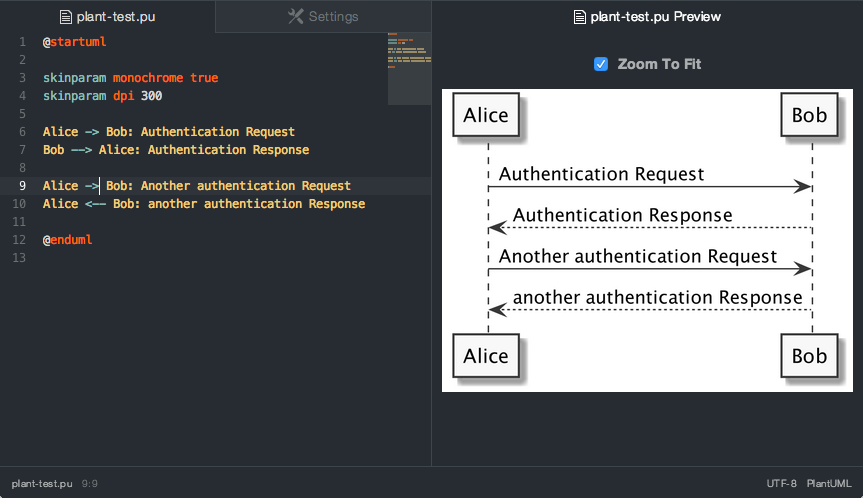
PlantUML is an open-source tool allowing users to create UML and other diagrams from a plain text language. Diagrams are defined using a simple and intuitive language. This can be used within many other tools. Images can be generated in PNG, in SVG or LaTeX format. It is also possible to generate ASCII art diagrams (only for sequence diagrams).
Try it online using plantuml online server.
Features
- Sequence diagram
- Use case diagram
- Class diagram
- Activity diagram
- Component diagram
- State diagram
- Object diagram
- Deployment diagram
- Timing diagram
- Wireframe graphical interface
- Archimate diagram
- Specification and Description Language (SDL)
- Ditaa diagram
- Gantt diagram
- Mathematic with AsciiMath or JLaTeXMath notation
Package parameters
/NoShortcuts- Do not create desktop shortcuts for plantuml and its manual.
VERIFICATION

Verification is intended to assist the Chocolatey moderators and community
in verifying that this package's contents are trustworthy.

Package can be verified like this:

1. Go to

   x32: https://sourceforge.net/projects/plantuml/files/plantuml.1.2017.15.jar/download

   to download the installer.

2. You can use one of the following methods to obtain the SHA256 checksum:
   - Use powershell function 'Get-FileHash'
   - Use Chocolatey utility 'checksum.exe'

   checksum32: C0BF0F8FCFA68DE6CB12E8C5C67EC61EFFFDBFB7EA32974CB8BE4A38DF94A415

Using AU:

   Get-RemoteChecksum https://sourceforge.net/projects/plantuml/files/plantuml.1.2017.15.jar/download

Information about license can be seen at:
    http://plantuml.com/download
$ErrorActionPreference = 'Stop'

Uninstall-BinFile 'plantuml'
rm $Env:USERPROFILE\Desktop\plantuml.lnk -ea 0 Log in or click on link to see number of positives.
- plantuml.1.2017.15.nupkg (9115700ad4f8) - ## / 59
In cases where actual malware is found, the packages are subject to removal. Software sometimes has false positives. Moderators do not necessarily validate the safety of the underlying software, only that a package retrieves software from the official distribution point and/or validate embedded software against official distribution point (where distribution rights allow redistribution).
Chocolatey Pro provides runtime protection from possible malware.
| Add to Builder | Version | Downloads | Last Updated | Status |
|---|---|---|---|---|
| PlantUML 1.2025.2 | 16045 | Thursday, March 6, 2025 | Approved | |
| PlantUML 1.2025.1 | 2111 | Sunday, February 16, 2025 | Approved | |
| PlantUML 1.2025.0 | 3735 | Wednesday, January 8, 2025 | Approved | |
| PlantUML 1.2024.8 | 3630 | Saturday, November 16, 2024 | Approved | |
| PlantUML 1.2024.7 | 4649 | Sunday, September 8, 2024 | Approved | |
| PlantUML 1.2024.6 | 6013 | Sunday, July 7, 2024 | Approved | |
| PlantUML 1.2024.5 | 5335 | Monday, May 27, 2024 | Approved | |
| PlantUML 1.2023.12 | 19199 | Saturday, October 21, 2023 | Approved | |
| PlantUML 1.2023.11 | 2317 | Thursday, September 28, 2023 | Approved | |
| PlantUML 1.2023.7 | 7260 | Sunday, May 14, 2023 | Approved | |
| PlantUML 1.2023.6 | 1920 | Wednesday, April 19, 2023 | Approved | |
| PlantUML 1.2023.5 | 2115 | Saturday, March 25, 2023 | Approved | |
| PlantUML 1.2023.4 | 2549 | Friday, March 10, 2023 | Approved | |
| PlantUML 1.2023.2 | 2986 | Monday, February 27, 2023 | Approved | |
| PlantUML 1.2023.1 | 2425 | Monday, January 30, 2023 | Approved | |
| PlantUML 1.2023.0 | 1743 | Tuesday, January 10, 2023 | Approved | |
| PlantUML 1.2022.14 | 1935 | Wednesday, December 7, 2022 | Approved | |
| PlantUML 1.2022.13 | 1558 | Sunday, November 20, 2022 | Approved | |
| PlantUML 1.2022.12 | 2155 | Monday, October 24, 2022 | Approved | |
| PlantUML 1.2022.8 | 2262 | Sunday, September 25, 2022 | Approved | |
| PlantUML 1.2022.7 | 2570 | Tuesday, August 23, 2022 | Approved | |
| PlantUML 1.2022.6 | 3420 | Wednesday, June 22, 2022 | Approved | |
| PlantUML 1.2022.5 | 3647 | Sunday, May 1, 2022 | Approved | |
| PlantUML 1.2022.4 | 1874 | Sunday, April 10, 2022 | Approved | |
| PlantUML 1.2022.3 | 1284 | Thursday, March 31, 2022 | Approved | |
| PlantUML 1.2022.2 | 2724 | Sunday, March 6, 2022 | Approved | |
| PlantUML 1.2022.1 | 2930 | Wednesday, February 2, 2022 | Approved | |
| PlantUML 1.2022.0 | 657 | Wednesday, January 12, 2022 | Approved | |
| PlantUML 1.2021.16 | 4643 | Thursday, December 9, 2021 | Approved | |
| PlantUML 1.2021.15 | 1032 | Wednesday, December 1, 2021 | Approved | |
| PlantUML 1.2021.14 | 2273 | Saturday, November 13, 2021 | Approved | |
| PlantUML 1.2021.13 | 1392 | Tuesday, November 2, 2021 | Approved | |
| PlantUML 1.2021.12 | 2791 | Wednesday, October 6, 2021 | Approved | |
| PlantUML 1.2021.11 | 2297 | Sunday, October 3, 2021 | Approved | |
| PlantUML 1.2021.10 | 3188 | Tuesday, August 31, 2021 | Approved | |
| PlantUML 1.2021.9 | 3373 | Monday, July 26, 2021 | Approved | |
| PlantUML 1.2021.8 | 2836 | Sunday, June 27, 2021 | Approved | |
| PlantUML 1.2021.7 | 3425 | Monday, May 24, 2021 | Approved | |
| PlantUML 1.2021.6 | 1343 | Saturday, May 15, 2021 | Approved | |
| PlantUML 1.2021.4 | 4214 | Monday, April 5, 2021 | Approved | |
| PlantUML 1.2021.3 | 1609 | Tuesday, March 23, 2021 | Approved | |
| PlantUML 1.2021.2 | 2383 | Monday, March 8, 2021 | Approved | |
| PlantUML 1.2021.0 | 4877 | Wednesday, January 13, 2021 | Approved | |
| PlantUML 1.2020.26 | 2165 | Tuesday, December 22, 2020 | Approved | |
| PlantUML 1.2020.24 | 532 | Saturday, December 19, 2020 | Approved | |
| PlantUML 1.2020.23 | 1037 | Monday, December 14, 2020 | Approved | |
| PlantUML 1.2020.22 | 1145 | Monday, December 7, 2020 | Approved | |
| PlantUML 1.2020.21 | 928 | Monday, November 30, 2020 | Approved | |
| PlantUML 1.2020.20 | 1334 | Sunday, November 22, 2020 | Approved | |
| PlantUML 1.2020.19 | 3910 | Tuesday, October 13, 2020 | Approved | |
| PlantUML 1.2020.18 | 1431 | Thursday, October 1, 2020 | Approved | |
| PlantUML 1.2020.17 | 1347 | Sunday, September 20, 2020 | Approved | |
| PlantUML 1.2020.16 | 207 | Tuesday, August 25, 2020 | Approved | |
| PlantUML 1.2020.15 | 5439 | Monday, June 29, 2020 | Approved | |
| PlantUML 1.2020.14 | 1099 | Sunday, June 21, 2020 | Approved | |
| PlantUML 1.2020.13 | 1015 | Monday, June 15, 2020 | Approved | |
| PlantUML 1.2020.12 | 1094 | Sunday, June 7, 2020 | Approved | |
| PlantUML 1.2020.11 | 1129 | Sunday, May 31, 2020 | Approved | |
| PlantUML 1.2020.10 | 1834 | Monday, May 18, 2020 | Approved | |
| PlantUML 1.2020.9 | 1401 | Monday, May 11, 2020 | Approved | |
| PlantUML 1.2020.8 | 1667 | Monday, April 27, 2020 | Approved | |
| PlantUML 1.2020.7 | 1079 | Monday, April 20, 2020 | Approved | |
| PlantUML 1.2020.6 | 2042 | Monday, April 6, 2020 | Approved | |
| PlantUML 1.2020.5 | 2480 | Thursday, March 19, 2020 | Approved | |
| PlantUML 1.2020.4 | 275 | Thursday, March 19, 2020 | Approved | |
| PlantUML 1.2020.3 | 280 | Thursday, March 19, 2020 | Approved | |
| PlantUML 1.2020.2 | 2249 | Monday, March 2, 2020 | Approved | |
| PlantUML 1.2020.1.20200226 | 678 | Wednesday, February 26, 2020 | Approved | |
| PlantUML 1.2020.1 | 223 | Monday, February 17, 2020 | Approved | |
| PlantUML 1.2020.0 | 3479 | Tuesday, January 14, 2020 | Approved | |
| PlantUML 1.2019.13 | 2368 | Wednesday, December 11, 2019 | Approved | |
| PlantUML 1.2019.12 | 3229 | Monday, November 4, 2019 | Approved | |
| PlantUML 1.2019.11.20191021 | 1736 | Monday, October 21, 2019 | Approved | |
| PlantUML 1.2019.11.20191001 | 2389 | Tuesday, October 1, 2019 | Approved | |
| PlantUML 1.2019.11 | 3216 | Monday, September 23, 2019 | Approved | |
| PlantUML 1.2019.10 | 1484 | Monday, September 16, 2019 | Approved | |
| PlantUML 1.2019.9 | 3400 | Tuesday, August 27, 2019 | Approved | |
| PlantUML 1.2019.8 | 4709 | Sunday, July 14, 2019 | Approved | |
| PlantUML 1.2019.6 | 3769 | Monday, May 27, 2019 | Approved | |
| PlantUML 1.2019.5 | 2881 | Sunday, April 21, 2019 | Approved | |
| PlantUML 1.2019.4 | 3185 | Saturday, March 30, 2019 | Approved | |
| PlantUML 1.2019.3 | 2494 | Monday, March 11, 2019 | Approved | |
| PlantUML 1.2019.2 | 840 | Saturday, March 2, 2019 | Approved | |
| PlantUML 1.2019.1 | 1239 | Wednesday, February 13, 2019 | Approved | |
| PlantUML 1.2019.0 | 1389 | Monday, January 14, 2019 | Approved | |
| PlantUML 1.2018.14 | 986 | Saturday, December 22, 2018 | Approved | |
| PlantUML 1.2018.13 | 1338 | Tuesday, November 27, 2018 | Approved | |
| PlantUML 1.2018.12 | 1356 | Monday, October 22, 2018 | Approved | |
| PlantUML 1.2018.11 | 1133 | Sunday, September 23, 2018 | Approved | |
| PlantUML 1.2018.10 | 1123 | Sunday, August 26, 2018 | Approved | |
| PlantUML 1.2018.9 | 1033 | Saturday, July 28, 2018 | Approved | |
| PlantUML 1.2018.8 | 1214 | Monday, June 25, 2018 | Approved | |
| PlantUML 1.2018.7 | 957 | Tuesday, June 12, 2018 | Approved | |
| PlantUML 1.2018.6.20180526 | 971 | Saturday, May 26, 2018 | Approved | |
| PlantUML 1.2018.6 | 616 | Tuesday, May 22, 2018 | Approved | |
| PlantUML 1.2018.5 | 895 | Sunday, May 6, 2018 | Approved | |
| PlantUML 1.2018.4 | 599 | Wednesday, May 2, 2018 | Approved | |
| PlantUML 1.2018.3 | 1009 | Friday, April 6, 2018 | Approved | |
| PlantUML 1.2018.2 | 1036 | Saturday, March 10, 2018 | Approved | |
| PlantUML 1.2018.1 | 1122 | Monday, January 29, 2018 | Approved | |
| PlantUML 1.2018.0 | 917 | Friday, January 5, 2018 | Approved | |
| PlantUML 1.2017.20 | 766 | Tuesday, December 12, 2017 | Approved | |
| PlantUML 1.2017.19 | 806 | Monday, November 13, 2017 | Approved | |
| PlantUML 1.2017.18 | 984 | Saturday, October 7, 2017 | Approved | |
| PlantUML 1.2017.16 | 606 | Thursday, October 5, 2017 | Approved | |
| PlantUML 1.2017.15 | 1119 | Monday, July 3, 2017 | Approved | |
| PlantUML 1.2017.14 | 658 | Thursday, June 8, 2017 | Approved | |
| PlantUML 1.2017.13 | 704 | Thursday, May 11, 2017 | Approved | |
| PlantUML 1.2017.12 | 615 | Thursday, May 4, 2017 | Approved |
2009 Arnaud Roques
-
- javaruntime (≥ 6.0.30)
- graphviz (≥ 2.38.0.1)
- chocolatey (≥ 0.10.3)
- chocolatey-core.extension (≥ 1.3)
Ground Rules:
- This discussion is only about PlantUML and the PlantUML package. If you have feedback for Chocolatey, please contact the Google Group.
- This discussion will carry over multiple versions. If you have a comment about a particular version, please note that in your comments.
- The maintainers of this Chocolatey Package will be notified about new comments that are posted to this Disqus thread, however, it is NOT a guarantee that you will get a response. If you do not hear back from the maintainers after posting a message below, please follow up by using the link on the left side of this page or follow this link to contact maintainers. If you still hear nothing back, please follow the package triage process.
- Tell us what you love about the package or PlantUML, or tell us what needs improvement.
- Share your experiences with the package, or extra configuration or gotchas that you've found.
- If you use a url, the comment will be flagged for moderation until you've been whitelisted. Disqus moderated comments are approved on a weekly schedule if not sooner. It could take between 1-5 days for your comment to show up.